From $59/year
PurchaseDisable User Login Pro
Disable User Login Pro provides advanced user account management for WordPress. It builds upon our popular free plugin which allows you to disable specific user accounts without deleting them and is actively used on thousands of websites.
All (5) |Administrator (1) |Subscriber (2)|Enabled (43) |
Key Features
Bulk CSV Import & Export
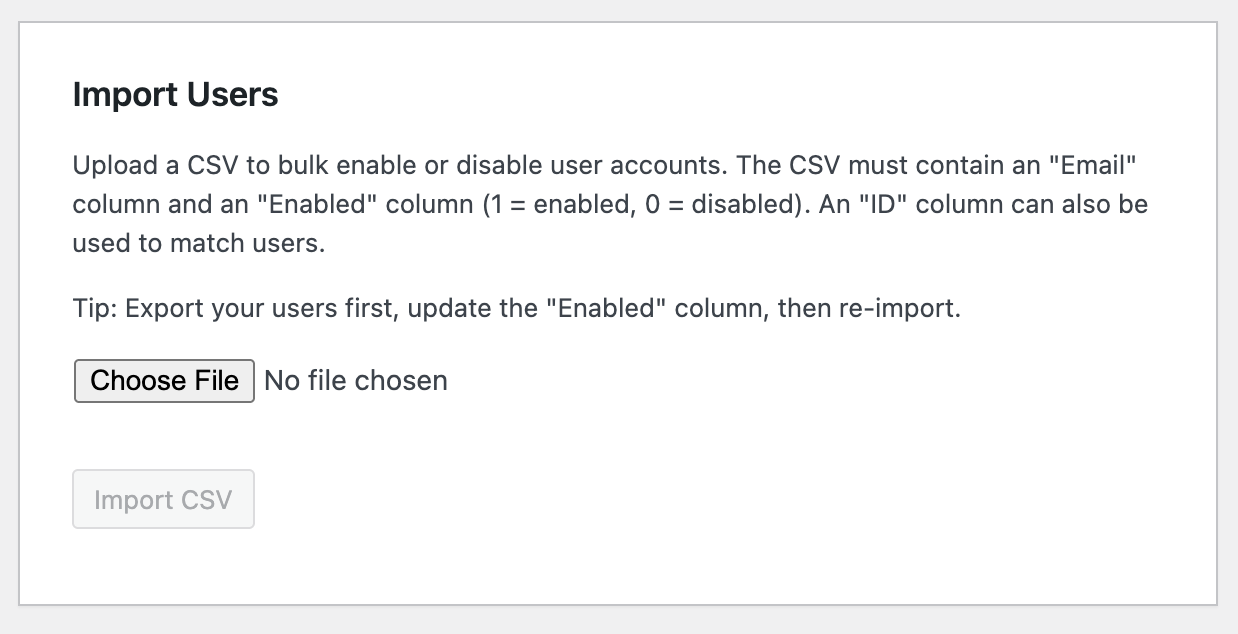
export all users with their enabled/disabled status, modify in a spreadsheet, and re-import to bulk enable or disable accounts in one step.
Email Notifications
automatically notify users when their account is disabled or re-enabled, with customizable email templates, merge tags ({display_name}, {site_name}, {login_url}, and more), and optional admin CC.
Audit Log
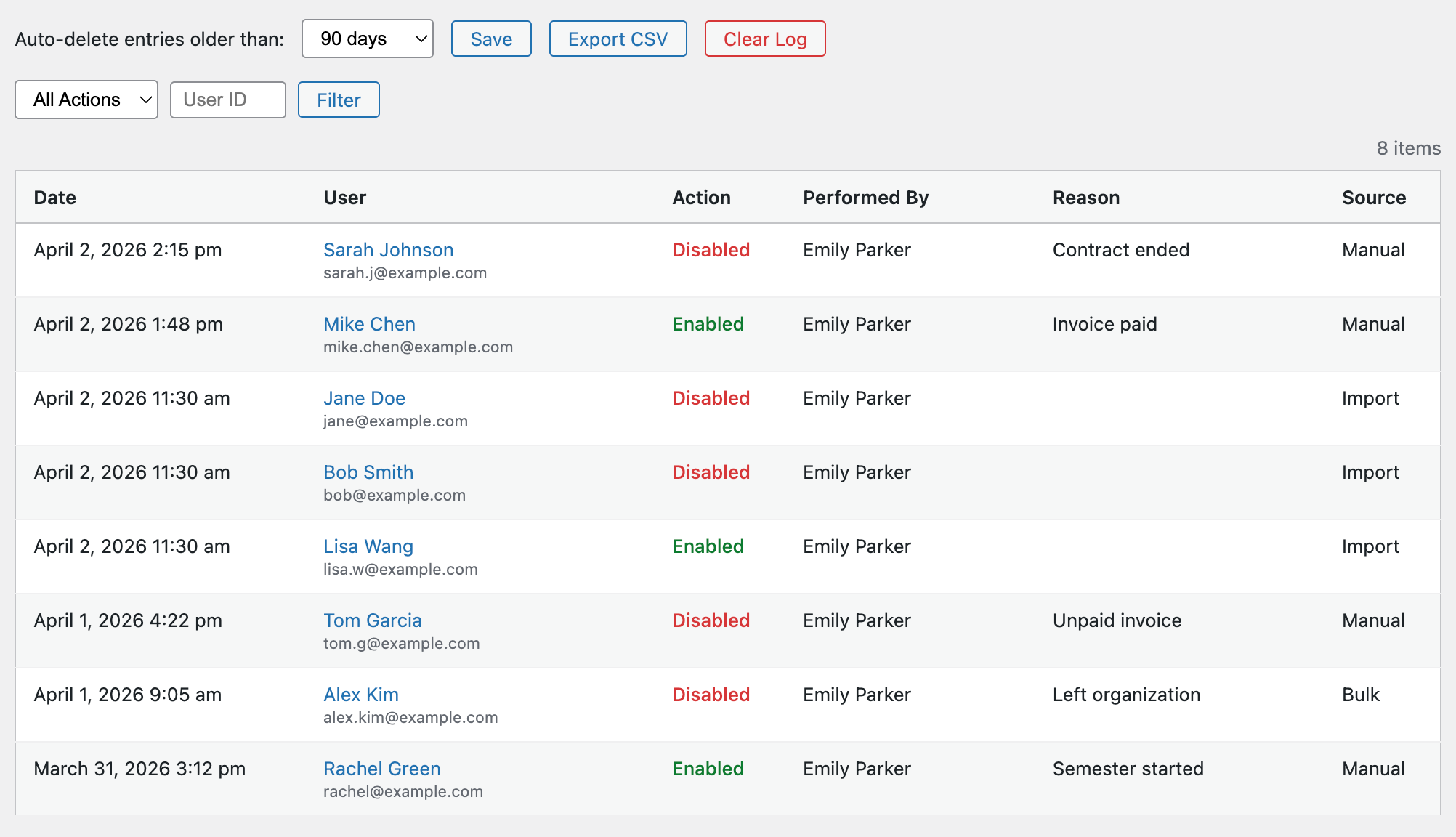
full history of every disable/enable action with timestamps, who performed the action, and why. Includes CSV export, configurable auto-purge retention, and filtering by action type or user.
Filterable & Sortable User List
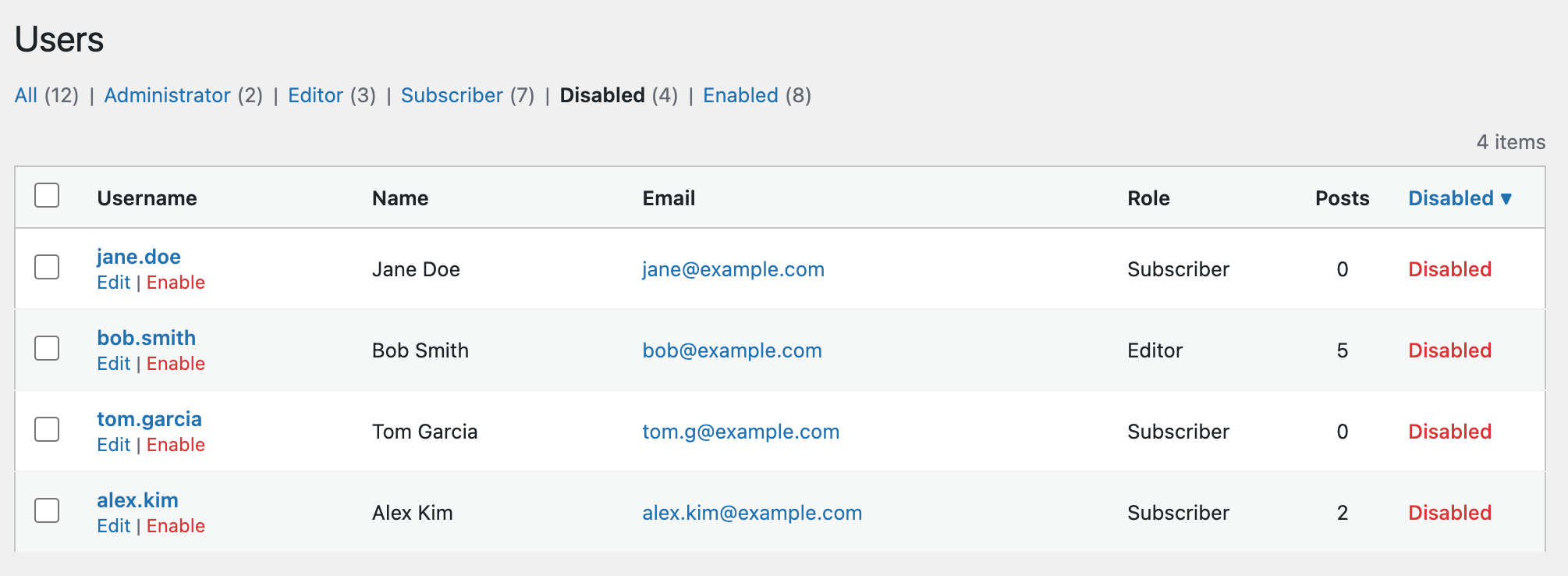
“Disabled” and “Enabled” filter views on the Users screen with count badges and a sortable Disabled column.
Smart Import Validation
matches users by ID or email, skips invalid entries with detailed reasons, and protects against disabling yourself or super admins.
Automatic Updates & Priority Support
activate your license key to receive automatic plugin updates and priority email support.
All features from the free Disable User Login plugin included.
Bulk CSV Import & Export
Managing hundreds or thousands of user accounts? We’ve got you covered!
Disable User Login Pro adds a powerful CSV import/export workflow for managing user accounts at scale. Export all users to a CSV, modify the Enabled column, and re-import to bulk enable or disable accounts in one step.
The import validates each row, matches users by ID or email, skips invalid entries with detailed reasons, and fires the same hooks as the free plugin so disabled users get force-logged-out immediately.
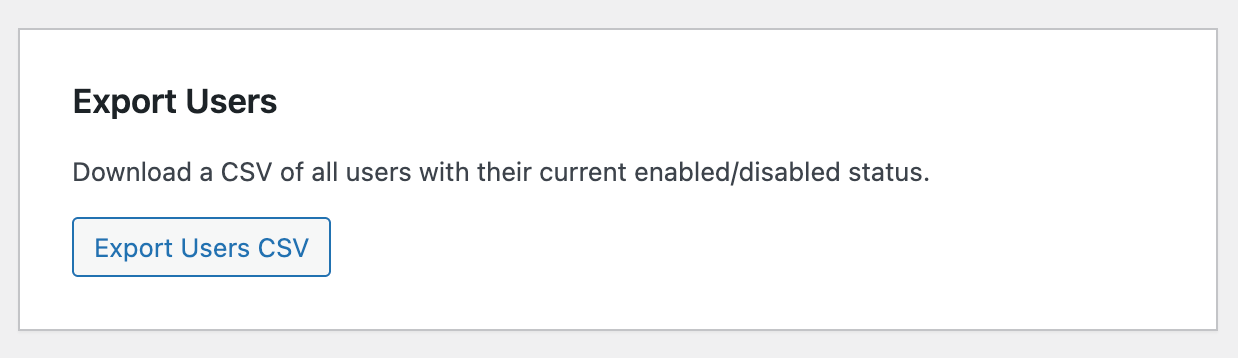
Email Notifications
Keep your users informed. Disable User Login Pro can automatically send an email when a user’s account is disabled or re-enabled.
Customize the subject and body with merge tags like {display_name}, {site_name}, {login_url}, and {disabled_by}. Optionally CC an admin on every notification.
Perfect for organizations that need to communicate account status changes to their users — no custom code required.

Audit Log
Know exactly who disabled or enabled an account, when it happened, and why.
The built-in audit log records every status change with timestamps, the admin who performed the action, an optional reason, and the source (manual, bulk, or import). Filter by action type or user, export the full log to CSV, and configure automatic purge after 30, 60, 90, 180, or 365 days.
Essential for compliance, accountability, and troubleshooting.
Filterable & Sortable User List
Stop scrolling through pages of users to find who’s disabled.
Disable User Login Pro adds “Disabled” and “Enabled” filter views to the WordPress Users screen — just like the built-in role filters — complete with count badges. The Disabled column is also sortable, so you can group all disabled users together with a single click.
Built for Scale
Whether you’re a nonprofit managing seasonal volunteers, a membership site onboarding new members, an agency managing client accounts, or a university handling student accounts at semester boundaries — Disable User Login Pro makes bulk user management effortless.
Export, modify, and re-import. It’s that simple.
License & Updates
Every license includes one year of automatic updates and priority email support. Enter your license key in Settings → Disable User Login → Pro to activate.
Need help? Our support team is here for you.
Choose Your License:
Single Site
$79$59/ year*
Introductory Price — Save 25%!
- Use on 1 WordPress Site
- 1 Year of Support & Updates
- Priority Email Support
* Prices listed are in USD. Introductory price of $59/year (regular price $79/year). Price is for a 12 month term only. You may cancel your subscription at any time. Active subscription license required for continued software updates and support access. All purchases are subject to our terms and condition of use.
System Requirements
- PHP 7.4 or later (8.0+ recommended).
- WordPress 6.2 or later.
- Disable User Login (free plugin) 2.0 or later.
Current Version v2.2.0
Change Log
Show Change LogHide Change Log
2.2.0 - Apr 2, 2026
- Feature: add audit log for disable/enable events
- Feature: add clear log button and auto-purge retention setting
- Feature: add CSV export for audit log
- Feature: add email notifications for disable/enable events
- Feature: add filterable Disabled/Enabled views and sortable column
- Fix: add top margin to audit log tab content
- Fix: store audit log timestamps in UTC and display in site timezone
2.1.0 - Apr 2, 2026
- Feature: add EDD license handler, updater, and license settings tab
- Feature: add plugin row license prompt, settings link, and support link
2.0.0 - Apr 2, 2026
- Minimum requirements raised from PHP 5.6 to 7.4 and WordPress 4.7 to 6.2.
- Feature: add CSV import to bulk enable/disable users
1.0.0
- Initial version.
Frequently Asked Questions
Why upgrade to Disable User Login Pro instead of using the free plugin?
The free Disable User Login plugin disables an individual account without deleting it; Disable User Login Pro is worth the upgrade once you need to manage accounts at scale, since it adds bulk CSV import/export for handling many accounts at once, automatic email notifications, and an audit log recording who disabled or re-enabled an account and when, none of which the free version includes.
What does Disable User Login Pro do?
Disable User Login Pro lets a WordPress administrator disable specific user accounts, blocking login while preserving the account, its content, and its history, and adds bulk management, notifications, and an audit trail on top of that core disable/enable function.
Can I disable or enable multiple user accounts at once?
Yes. Disable User Login Pro supports bulk CSV import and export: export all users with their current enabled/disabled status, edit the list in a spreadsheet, and re-import it to enable or disable many accounts in a single step, with validation that matches users by ID or email, skips invalid rows with a reason, and blocks you from accidentally disabling yourself or a super admin.
Does Disable User Login Pro notify users when their account is disabled?
Yes. Disable User Login Pro can automatically email a user when their account is disabled or re-enabled, using a customizable template with merge tags for the user's display name, the site name, the login URL, and who performed the action, with an optional copy sent to an admin address.
Does Disable User Login Pro keep a record of who disabled or enabled an account, and why?
Yes. Disable User Login Pro logs every disable and enable action with a timestamp, the user who performed it, and the reason given; the log can be exported to CSV, filtered by action type or user, and set to auto-purge after a configurable retention period of 30, 60, 90, 180, or 365 days.
How is Disable User Login Pro different from the free Disable User Login plugin?
Disable User Login Pro includes all features of the free Disable User Login plugin, which lets you disable a WordPress user account without deleting it, and adds bulk CSV import/export, automatic email notifications on status change, and an audit log of every disable/enable action with exportable history.
Can I filter or sort my user list by disabled or enabled status?
Yes. Disable User Login Pro adds Disabled and Enabled filter views to the WordPress user list, each showing a count badge, along with a sortable status column.
What does it take to run Disable User Login Pro?
Disable User Login Pro requires PHP 7.4 or later (8.0 or later recommended), WordPress 6.2 or later, and version 2.0 or later of the free Disable User Login plugin installed as its base.