

WP WooCommerce Mailchimp Pro
The WooCommerce logo and MailChimp logo are trademarks of Automattic and Mailchimp respectively.
Key Features
- Easily add all customers who purchase products to a designated Mailchimp list upon order creation or order completion.
- Optionally, add customers to Mailchimp interest groups and tags.
- Per-product, per-list, and variation-source double opt-in controls.
- Set product-specific lists, groups and tags to further segment customers based on individual products purchased.
- WooCommerce Subscription Support and Integration.
- Mailchimp eCommerce integration (Coming soon!)
- Merge field mapping for fine-grained control over which fields map to Mailchimp merge fields
Product-Specific Lists, Groups and Tags
Want to segment customers based on specific products purchased? We’ve got you covered! WP WooCommerce Mailchimp Pro adds a Mailchimp tab on each WooCommerce product details page where you can select one or more product-specific lists you’d like to assign to customers who purchase the product. It’s that simple! You can also, optionally, select any applicable Mailchimp interest groups or tags and configure double opt-in settings all at the WooCommerce product level.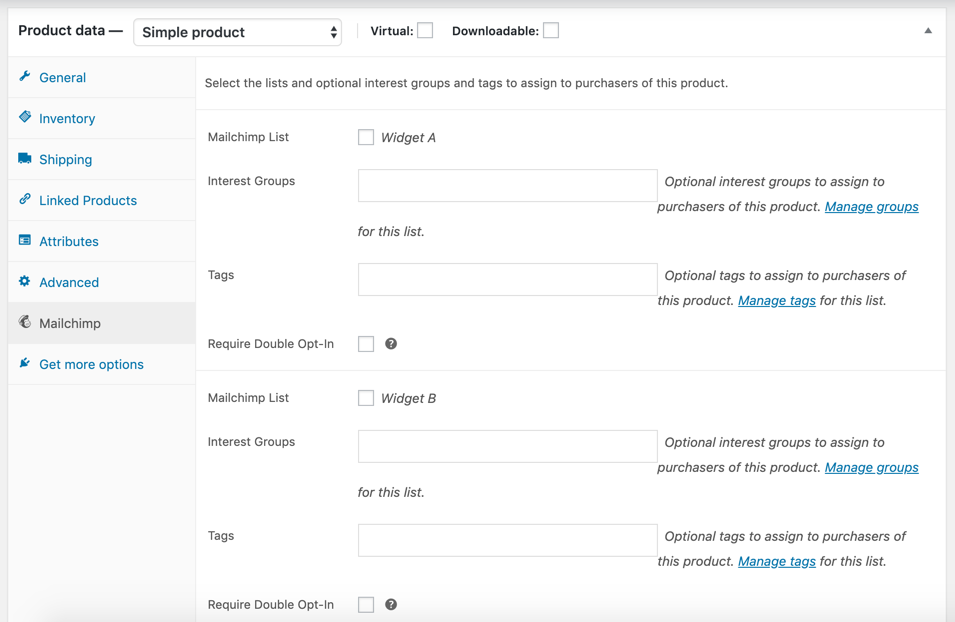
WooCommerce Subscriptions Support
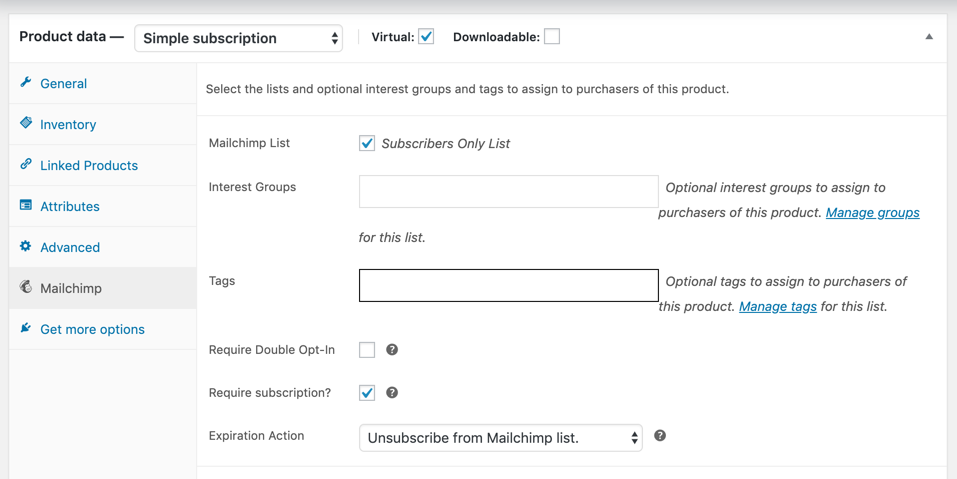
Running a subscription or membership site with WooCommerce Subscriptions? Want to restrict email content and campaigns only to paying subscribers? No problem! For WooCommerce Subscription products, simply select the “Require subscription” checkbox and then customers will be required to have an active subscription in order to maintain membership in the Mailchimp list.Choose Your License:
Pay Yearly and Save 55%
25 Sites
$149/ year*
Single Site
$49/ year*
5 Sites
$99/ year*
Pay Month-to-Month
25 Sites
$29/ month*
Single Site
$9/ month*
5 Sites
$19/ month*
- PHP 7.4+.
- WordPress 6.2+.
- WooCommerce 8.3+.
- WP WooCommerce Mailchimp 3.0+ or later.

Frequently Asked Questions
Why upgrade to WP WooCommerce Mailchimp Pro instead of using the free plugin?
The free WP WooCommerce Mailchimp plugin provides designated-list sync, configurable order timing, checkout opt-in, global double opt-in, groups, and tags. WP WooCommerce Mailchimp Pro adds per-product, per-list, and per-variation control for stores that need more precise segmentation and subscription-aware sync.
What does WP WooCommerce Mailchimp Pro do?
WP WooCommerce Mailchimp Pro extends the free plugin's Mailchimp sync with per-product and per-list settings for lists, groups, tags, and double opt-in, plus variation overrides and subscription-aware sync. Customer sync follows the order status timing configured in the free plugin.
Can I sync customers to different Mailchimp lists depending on what they bought?
Yes. WP WooCommerce Mailchimp Pro supports product-specific lists, groups, and tags. For variations, variation-level segmentation applies when the variation override is enabled; otherwise the parent product's settings apply.
Does WP WooCommerce Mailchimp Pro work with WooCommerce Subscriptions?
Yes. Lists marked for subscription sync can require an active qualifying subscription. When a subscription changes from active to non-active, the configured expiration action may unsubscribe the customer or remove groups or tags; the action is skipped when another active qualifying subscription exists.
How does WP WooCommerce Mailchimp Pro control double opt-in?
The free WP WooCommerce Mailchimp plugin provides a global double opt-in setting and honors its checkout opt-in setting. WP WooCommerce Mailchimp Pro adds double opt-in control per product and per list, with variation settings used when the variation override is enabled.
When are customers added to Mailchimp?
WP WooCommerce Mailchimp Pro follows the order timing configured in the free WP WooCommerce Mailchimp plugin. The store can sync customers when an order reaches pending, processing, or completed status.
What does it take to run WP WooCommerce Mailchimp Pro?
WP WooCommerce Mailchimp Pro requires PHP 7.4 or later, WordPress 6.2 or later, WooCommerce 8.3 or later, and version 3.0 or later of the free WP WooCommerce Mailchimp plugin installed as its base.